The best Blackboard Ally alternatives in 2026
Five alternatives to Blackboard Ally, now called Anthology Ally, for checking and fixing course files against WCAG 2.1 AA, compared on what they fix, which files they cover, and what they cost.
Last updated . Every competitor fact links to the vendor's own documentation.
Quick comparison
Ally is included as the baseline.
| Tool | Works in | Fixes files | Alternative formats | Pricing |
|---|---|---|---|---|
| Inkable DocsOur recommendation | Every major LMS, Google Docs and Slides, Microsoft Word and PowerPoint, and Google Classroom | Yes: fixes Word, PowerPoint, and HTML and replaces the file in the course, with Undo | Redundant: Inkable Docs fixes the original file, so every student gets the accessible version by default | Published add-on plans; flat institution-wide pricing for LMS integrations |
| YuJa Panoramaby YuJa | Blackboard, Canvas, Moodle, D2L, and PowerSchool | Yes: inline remediation with file replacement in the LMS. AI remediation is an optional add-on module | Yes: audio, ePub, braille, HTML, and more | Quote only. Public board records: $99,950 a year for the core licence across Colorado's community college system, and up to $77,081 over three years at Elgin Community College |
| UDOIT Advantage (and open-source UDOIT)by Cidi Labs | Canvas (UDOIT Advantage); Canvas and D2L Brightspace (open-source UDOIT) | Mostly guidance. Instructors fix files themselves and upload the replacement; Word and PowerPoint fixing is not documented | Yes (Advantage); not documented for open source | Quote only, by FTE, plus a first-year implementation fee; open-source UDOIT is free |
| Pope Tech Canvas Accessibility Guide and Dashboardsby Pope Tech | Canvas | Yes for HTML in the Canvas editor; file fixing is not documented | Not documented | Published: $0.20 per FTE a year (Guide, $1,200 minimum); $1 per FTE a year (Dashboards, $2,400 minimum) |
| Built-in Canvas and D2L Brightspace checkersby Instructure and D2L | Canvas and D2L Brightspace | Minimal: a limited set of common issues on LMS pages. Canvas adds optional AI alt text (off by default) | Not documented | Included with the LMS |
| Blackboard AllyBaseline | Blackboard Learn, Canvas, D2L Brightspace, Moodle, and Schoology | Instructions only for Word and PowerPoint. PDF Quick Fixes for title, language, OCR, tags, and image alt text | Yes: audio, ePub, electronic braille, HTML, BeeLine, Enhanced Reader, and more | The highest list prices on this page: an annual licence by FTE, with board approvals of up to $73,542 a year |
Who this comparison is for
- Accessibility and disability services teams responsible for course materials
- Instructional designers who spend their time fixing files Ally has flagged
- LMS administrators and procurement reviewing the Ally renewal
- Faculty who need course files fixed, not only scored
Why institutions look for a Blackboard Ally alternative
Word and PowerPoint fixes are left to the instructor
For a Word or PowerPoint file, Ally's Instructor Feedback explains the problem and stops there. The instructor has to leave the LMS, open the file in Microsoft Office or Google Docs, work out where the issue is and how to fix it, then upload the file again. The tool that found the problem does nothing to fix it, for the most common file types in a course.
PDF Quick Fixes only reach file properties and tags
Ally's in-place fixes are PDF Quick Fixes: title, language, OCR for scanned pages, auto-tagging, and image alt text. A PDF is a finished output, not a file authors edit, so the content itself is out of reach. Heading structure, tables, reading order, and contrast still have to be fixed in the source document and exported again, and that new export loses anything fixed in the old PDF.
Checks follow rules, not meaning
Ally checks whether a document has headings, alt text, tags, and enough contrast. It does not check whether a heading's level matches its place in the argument, whether a typed list should be a real list, or whether a description says anything useful.
A 100% score is not proof the file is accessible
Ally describes a Perfect score as “no accessibility issues identified” by its own rules. Problems its rules cannot see still need a person to find them, so a high score is not a substitute for review.
The highest list prices
Ally is licensed for the whole institution by FTE. Anthology's AWS Marketplace listing prices a 12-month contract at $15,000–$150,000 for under 2,000 FTE and $110,000–$1,100,000 for 25,000–50,000 FTE, before implementation. Public board records show what colleges pay: City Colleges of Chicago approved up to $73,542 for 2024 alone, and Sauk Valley Community College approved $88,553 over five years for Ally and Ally for Websites.
What Blackboard Ally does well
Ally runs inside the LMS, scores every course file, explains issues to instructors, and generates alternative formats for students.
- Works in
- Blackboard Learn, Canvas, D2L Brightspace, Moodle, and Schoology
- Checks
- PDF, Word, PowerPoint, OpenOffice files, uploaded HTML, LMS editor content, and YouTube captions
- Fixes files
- Instructions only for Word and PowerPoint. PDF Quick Fixes for title, language, OCR, tags, and image alt text
- Alternative formats
- Yes: audio, ePub, electronic braille, HTML, BeeLine, Enhanced Reader, and more
- Pricing
- The highest list prices on this page: an annual licence by FTE, with board approvals of up to $73,542 a year
- Best for
- Institutions that mainly want course-wide scores and alternative formats
Blackboard Ally Pros
- Runs inside Blackboard Learn (Original and Ultra), Canvas, D2L Brightspace, Moodle and Open LMS, and Schoology
- Generates alternative formats for students, including audio, ePub, electronic braille, and translated versions
- Scores every course file and rolls the scores into an institutional report
- Long track record with institutions, with a published Accessibility Conformance Report
Blackboard Ally Cons
- Word and PowerPoint fixes are left to the instructor, outside the LMS
- PDF Quick Fixes reach file properties and tags, not the content
- Rule-based checks; a 100% score means no issues found by Ally's rules
- The highest list prices of any tool on this page

Blackboard Ally alternatives compared
Ranked by how much of the fixing each tool does on course files.
1. Inkable Docs
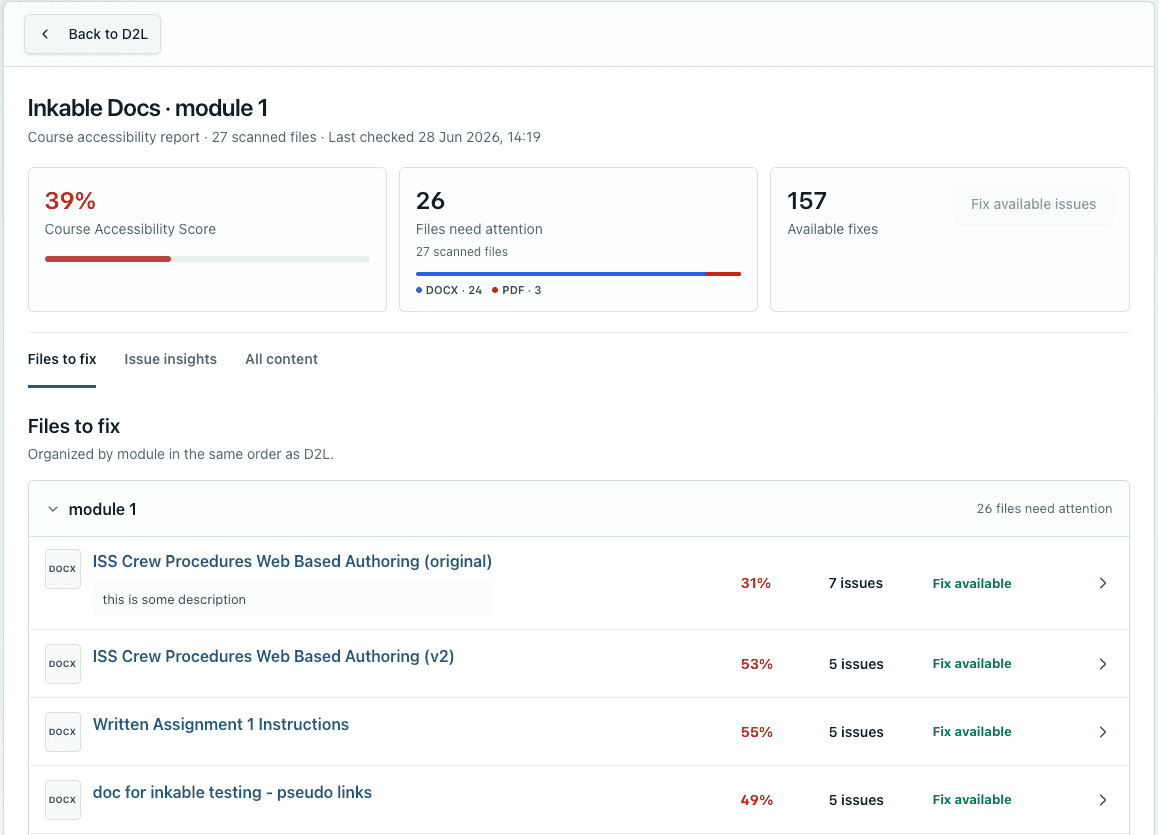
by Inkable Docs LLCOur recommendationChecks course files against WCAG 2.1 AA and PDF/UA, fixes Word, PowerPoint, and HTML content, and replaces the file in the course with an Undo. The same checks run in Google Docs, Google Slides, and Microsoft Office files, before material reaches the LMS.
- Works in
- Every major LMS, Google Docs and Slides, Microsoft Word and PowerPoint, and Google Classroom
- Checks
- Word, PowerPoint, PDF, and HTML course content
- Fixes files
- Yes: fixes Word, PowerPoint, and HTML and replaces the file in the course, with Undo
- Alternative formats
- Redundant: Inkable Docs fixes the original file, so every student gets the accessible version by default
- Pricing
- Published add-on plans; flat institution-wide pricing for LMS integrations
- Best for
- Teams that want course files fixed, not only scored, wherever they are written
Inkable Docs Pros
- Fixes Word and PowerPoint files and puts them back in the course
- Checks headings, lists, and titles by meaning, not only by rule
- AI-generated alt text in bulk for the author to review
- Works in Google Docs, Slides, and Office files as well as the LMS
- Admin summaries and daily or weekly instructor summary emails
Inkable Docs Cons
- Newer than Ally, with a shorter institutional track record
- AI-generated alt text and fixes should still be reviewed by the author
- PDFs get a detailed report; fixes are made in the source document, not the PDF
2. YuJa Panorama
by YuJaAn LMS accessibility platform that checks PDFs, Word, PowerPoint, images, and LMS content, offers AI-assisted remediation and file replacement in the LMS, and generates alternative formats for students.
- Works in
- Blackboard, Canvas, Moodle, D2L, and PowerSchool
- Checks
- PDF, Word, PowerPoint, images, and LMS content areas
- Fixes files
- Yes: inline remediation with file replacement in the LMS. AI remediation is an optional add-on module
- Alternative formats
- Yes: audio, ePub, braille, HTML, and more
- Pricing
- Quote only. Public board records: $99,950 a year for the core licence across Colorado's community college system, and up to $77,081 over three years at Elgin Community College
- Best for
- Multi-LMS institutions that want scanning, fixing, and alternative formats from one vendor
YuJa Panorama Pros
- Fixes PDF, Word, PowerPoint, and LMS content without leaving the LMS
- Integrates with five LMS platforms
- Alternative formats for students, plus a Microsoft Office add-in
YuJa Panorama Cons
- AI is an add-on, not the core: AutoPilot and Structural Remediation are optional modules, and YuJa does not describe its core checks as AI-based
- AutoPilot is described only as “AI-powered automatic remediation”, with no list of the issues it fixes
- No documented check of whether headings, lists, or titles match the content's meaning
- Expensive: the largest public contract we found, $99,950 a year for the core licence, with no published price list
- Release notes describe falling back to manual download and re-upload when file replacement fails
3. UDOIT Advantage (and open-source UDOIT)
by Cidi LabsA Canvas checker that works much like Ally: it scans course content and uploaded documents, scores them, and walks instructors through what to change. Beyond converting a document to a Canvas page or auto-tagging a PDF, fixing files is left to the instructor, so faculty still need a separate way to remediate them. The free, self-hosted UDOIT it grew from checks HTML content only.
- Works in
- Canvas (UDOIT Advantage); Canvas and D2L Brightspace (open-source UDOIT)
- Checks
- Course content and uploaded documents (Advantage); HTML content only (open source)
- Fixes files
- Mostly guidance. Instructors fix files themselves and upload the replacement; Word and PowerPoint fixing is not documented
- Alternative formats
- Yes (Advantage); not documented for open source
- Pricing
- Quote only, by FTE, plus a first-year implementation fee; open-source UDOIT is free
- Best for
- Canvas-only institutions, or IT teams that want a free HTML scanner
UDOIT Advantage (and open-source UDOIT) Pros
- Scans files as well as HTML, and swaps in a fixed file wherever it appears
- Student-generated alternative formats
- A free open-source version exists for self-hosting
UDOIT Advantage (and open-source UDOIT) Cons
- A checker with guidance, like Ally: faculty are left to find their own way to fix files
- UDOIT Advantage supports Canvas only
- No AI features documented
- Open-source UDOIT does not scan files and needs in-house hosting
UDOIT lists 136 issues to resolve and 6 files it cannot scan, which the instructor must review and update by hand. Captured in our test course. 4. Pope Tech Canvas Accessibility Guide and Dashboards
by Pope TechCanvas tools that check and fix HTML in Canvas content from inside the editor, with dashboards from course to whole-instance level. PDF checking is a beta add-on.
- Works in
- Canvas
- Checks
- HTML in Canvas content; PDFs through a beta add-on. Word and PowerPoint are not documented
- Fixes files
- Yes for HTML in the Canvas editor; file fixing is not documented
- Alternative formats
- Not documented
- Pricing
- Published: $0.20 per FTE a year (Guide, $1,200 minimum); $1 per FTE a year (Dashboards, $2,400 minimum)
- Best for
- Canvas schools that want low-cost, transparent HTML checking and reporting
Pope Tech Canvas Accessibility Guide and Dashboards Pros
- Published, low per-FTE pricing
- Fixes HTML issues in place from the Canvas editor
- Reporting at course, user, and instance level
Pope Tech Canvas Accessibility Guide and Dashboards Cons
- Canvas only
- PDF checking is a beta add-on and does not fix PDFs
- No Word, PowerPoint, or AI fixing documented
5. Built-in Canvas and D2L Brightspace checkers
by Instructure and D2LThe accessibility checkers included with the LMS. Canvas's course checker scans Pages and Assignments, and D2L Brightspace's checker runs in the HTML editor. Their fixes are minimal and incomplete: a limited set of common issues on LMS pages, with uploaded files left untouched. Instructure and D2L build learning platforms, and accessibility is one feature among many rather than their core focus.
- Works in
- Canvas and D2L Brightspace
- Checks
- Native LMS content (HTML); not PDF, Word, or PowerPoint files
- Fixes files
- Minimal: a limited set of common issues on LMS pages. Canvas adds optional AI alt text (off by default)
- Alternative formats
- Not documented
- Pricing
- Included with the LMS
- Best for
- Courses built mostly from LMS pages rather than uploaded documents
Built-in Canvas and D2L Brightspace checkers Pros
- No extra cost
- Fixes issues in place in the LMS editor
- Canvas offers bulk AI alt text for hosted images
Built-in Canvas and D2L Brightspace checkers Cons
- Fixes are minimal and incomplete, covering a limited set of common issues
- Accessibility is a side feature of an LMS, not the vendor's core focus
- Does not check PDF, Word, or PowerPoint files
- Canvas's course checker cannot scan courses with more than 1,000 items
- Canvas AI alt text is off by default, with future pricing not yet published

How to choose a Blackboard Ally alternative
Use these criteria to evaluate any course accessibility tool, including ours.
Fixes, not only scores
Check whether the tool fixes Word, PowerPoint, and PDF files itself, or explains the issue and leaves the fix to the instructor.
Coverage of uploaded files
Most course barriers sit in uploaded documents. Some tools only check native LMS pages.
Checks based on meaning
A heading sequence can be valid and still wrong. Look for checks that judge whether structure matches the content.
Where it works
Confirm the tool supports your LMS, and whether it can check documents before they are uploaded.
Evidence for compliance
Course and institution reports should map findings to WCAG 2.1 AA and show what was fixed, not only what was found.
Total cost
Compare annual licence, implementation fees, and paid add-ons. Some vendors publish prices; others are quote only.
Inkable Docs vs. Blackboard Ally at a glance
| Capability | Inkable Docs | Ally |
|---|---|---|
| Word and PowerPoint files | Fixes the file and replaces it in the course, with an Undo that restores the original | Instructions only. The instructor opens the file in Office or Google Docs, works out the fix, and uploads it again |
| PDF files | Detailed PDF/UA and Matterhorn report. Fixes are made in the source document, then a new PDF is exported | Quick Fixes for title, language, OCR, auto-tagging, and image alt text. Headings, tables, reading order, and contrast still need the source file |
| Checks based on meaning | Judges whether heading levels, lists, and titles match what the content says, and flags meaning conveyed only by color | Rule-based checks. Ally's documentation describes no check of whether structure matches meaning |
| Image alt text | Generates descriptions in bulk for the author to review, and reviews the quality of existing alt text | AI Alt Text Assistant suggests one description at a time. It is off by default and each description needs instructor approval |
| Pricing | Published plans for the add-on, and flat institution-wide pricing for LMS integrations | Annual institutional licence priced by FTE band. The public AWS listing starts at $15,000–$150,000 a year for under 2,000 FTE, before implementation |
Read the full comparison: Inkable Docs vs. Blackboard Ally.
How to evaluate Inkable Docs against Ally
- 1
Install Inkable Docs in your LMS
Add Inkable Docs to a course in your LMS. Ally can stay in place while you compare results on the same files before you switch.
- 2
Pick a real course
Choose a course with Word files, slide decks, PDFs, and LMS pages, ideally one Ally scores below 100%.
- 3
Compare the work, not only the scores
For each file, note what each tool found and how much of the fix it did. Count the files an instructor had to open and upload again.
- 4
Review the evidence
Use Inkable Docs' course reports, admin summaries, and instructor summary emails to show progress to departments and compliance reviewers.
How we compared these tools
Every competitor fact comes from the vendor's own product pages, documentation, release notes, or published pricing, checked on November 16, 2026. Where a vendor does not document a capability, we say "not documented" rather than assume it is missing.
No automated tool replaces human review. Our capability boundaries page sets out what Inkable Docs automates and what still needs a person.
Sources
- Anthology: Instructor FAQs for Ally
- Anthology: Ally for LMS 2026 release notes
- Blackboard Ally on AWS Marketplace (12-month contract pricing)
- Sauk Valley Community College board approval for Blackboard Ally (2022)
- City Colleges of Chicago board approval for Blackboard Ally (2024 term)
- Inkable Docs capability boundaries
- Colorado Community College System board item: YuJa contract (Feb 2024)
- Elgin Community College board book (Nov 2024), Board Action 059-T-25
- YuJa Panorama product page
- YuJa Panorama release notes
- Cidi Labs UDOIT Advantage
- Cidi Labs UDOIT FAQ
- UDOIT on GitHub
- Pope Tech for courses
- Pope Tech pricing
- Pope Tech 2026 dashboard updates
- Canvas: How do I use the Accessibility Checker?
- Instructure: course accessibility tooling announcement
- D2L: Brightspace Accessibility Checker
Frequently asked questions
Everything you need to know about how Inkable Docs checks, fixes, and documents accessibility across authoring tools, LMS course materials, and PDF workflows. Need more help? Reach out to support@inkabledocs.com.
See what gets fixed in your own courses
Run Inkable Docs in one of your own courses and see how much more of the work it does than Ally.
Already under contract? We pay what's left on it when you switch.