10 Best Accessibility Remediation Tools for Academic Materials
By Jerry McGregor · Facts last checked
Most of what students open in a course is a document: a syllabus in Word, lecture slides in PowerPoint or Google Slides, readings as PDFs. At public colleges and universities, ADA Title II requires those files to meet WCAG 2.1 AA, and accessibility teams cannot fix thousands of them by hand.
This guide compares ten tools that check and fix academic materials. They do different jobs: some work across every course in the LMS, some help authors fix documents as they write, some repair finished PDFs, and one converts files into alternative formats. Most institutions need more than one kind.
How these tools were compared
Every statement about a tool comes from that vendor's own product pages, documentation, published pricing, or public board records, checked on November 24, 2026. Where a vendor does not describe a capability, the entry says "not documented" rather than assume it is missing. Each tool is judged on:
- Whether it fixes files or only reports on them
- Whether fixes land in the source document or the PDF
- Where it works: the LMS, authoring tools, or both
- Which standards it reports against
- What it costs
The four kinds of tool

- Course-wide (LMS) tools scan every file in every course and report at course and institution level. Inkable Docs, YuJa Panorama, and Blackboard Ally.
- Source-document tools check Word, PowerPoint, or Google Docs files while they are written. Inkable Docs, Microsoft's Accessibility Checker, and Grackle Docs.
- PDF remediation tools repair finished PDFs when the source is not available. PREP, CommonLook, Equidox, and Adobe Acrobat Pro.
- Alternative format services convert files into audio, braille, or ePub for students. SensusAccess.
Inkable Docs appears in two categories because it fixes files both across the LMS and inside Google Docs, Google Slides, Word, and PowerPoint.
Quick comparison
| Tool | Kind | Works in | Fixes | Pricing |
|---|---|---|---|---|
| Inkable Docs | Course-wide (LMS) | Every major LMS (Blackboard, Canvas, D2L Brightspace, Moodle, Schoology), Google Classroom, Google Docs and Slides, and Microsoft Word and PowerPoint files | Fixes Word, PowerPoint, and HTML and replaces the file in the course, with Undo. Fixes PDFs at the source document, then exports an accessible PDF | Published add-on plans, including a free plan; flat institution-wide pricing for LMS integrations |
| YuJa Panorama | Course-wide (LMS) | Blackboard, Canvas, Moodle, D2L Brightspace, and PowerSchool, plus an Office add-in and Google Workspace and OneDrive scanning | Remediation with file replacement in the LMS. AutoPilot (automatic AI fixing) and Structural Remediation (PDF tagging and reading order) are add-on modules | Quote only. Public board records: $99,950 a year for the core licence across Colorado's community college system |
| Blackboard Ally (Anthology Ally) | Course-wide (LMS) | Blackboard Learn, Canvas, D2L Brightspace, Moodle, and Schoology | Instructions only for Word and PowerPoint. PDF Quick Fixes for title, language, OCR, tags, and image alt text | Annual licence by FTE. The public AWS listing starts at $15,000–$150,000 a year for under 2,000 FTE |
| PREP | PDF remediation | Web, with LMS integrations for Canvas, Blackboard, and D2L Brightspace, plus checker and auto-tag APIs | AI auto-tagging and alt text in the PDF, with a web editor for review. The vendor claims 95% of a document is remediated automatically | Quote only |
| CommonLook | PDF remediation | Browser or desktop (CommonLook PDF), Microsoft Office (CommonLook Office), and an Acrobat Pro plugin (PDF Validator) | AI-driven tagging for tables, lists, and forms, manual tagging tools, and a Fix Wizard. CommonLook Edu converts files to large print, e-text, and braille | Quote only, with a free 7-day trial |
| Equidox | PDF remediation | Cloud or an on-premises virtual appliance, with bulk import and an API | AI zone detection with manual editing; Zone Transfer copies tags between similar PDFs. Equidox AI remediates batches automatically | Quote only |
| Adobe Acrobat Pro | PDF remediation | Desktop Acrobat Pro; no LMS integration documented | Autotag and optional cloud AI auto-tagging, then manual tag and reading-order editing in the PDF | Published: US$19.99 a month on an annual plan for individuals and for students and teachers; US$23.99 per licence a month for business |
| Microsoft Accessibility Checker | Source documents | Microsoft 365 desktop and web apps | Recommended actions applied by the author, one issue at a time. Word's Accessibility Assistant groups suggestions but does not fix automatically | Included with Microsoft 365 |
| Grackle Docs | Source documents | Google Docs, with separate Slides and Sheets add-ons | Guided, step-by-step fixes made by the author | Free with paid features; paid pricing by quote request |
| SensusAccess | Alternative formats | Web form, SensusAccess Inside Canvas and Brightspace, a generic LTI integration, and an API | Creates new files in other formats; the original course file is unchanged | Quote only, under an institutional service agreement |
The 10 tools, compared
1. Inkable Docs
by Inkable Docs LLCTop pickCourse-wide (LMS)
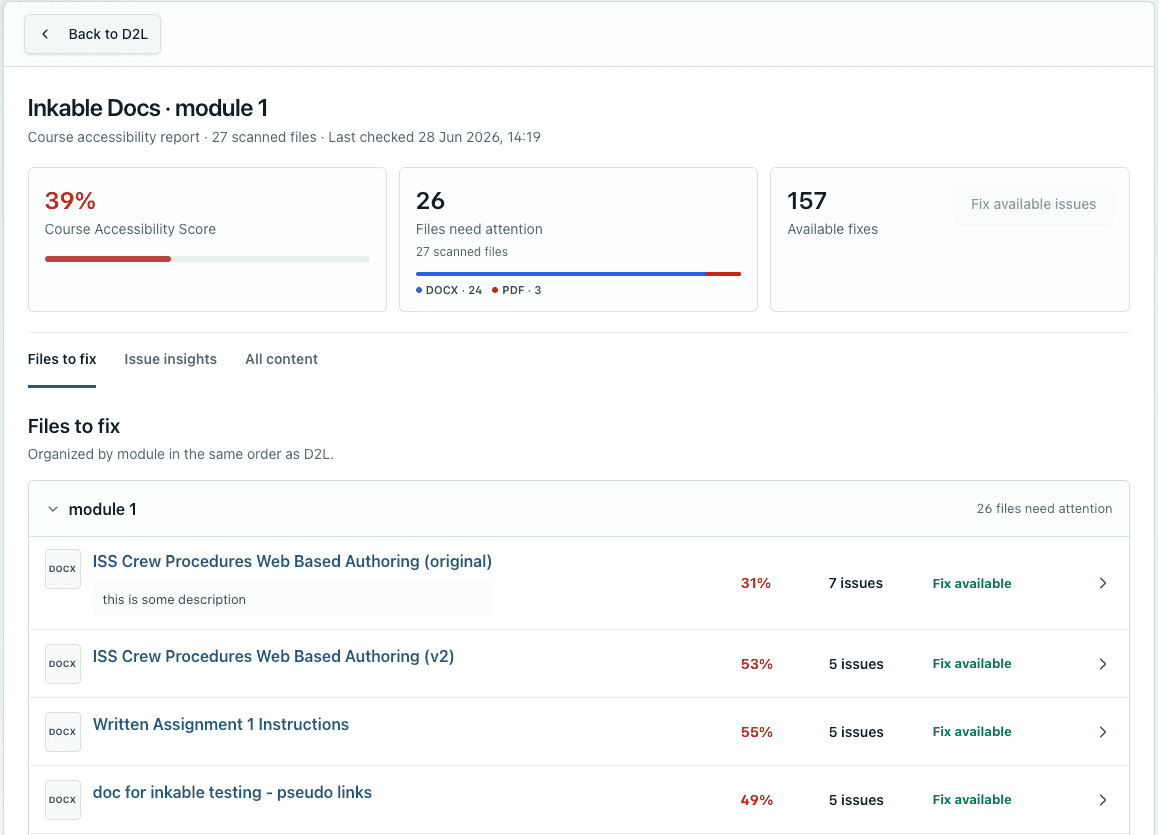
Checks course files against WCAG 2.1 AA and PDF/UA, fixes Word, PowerPoint, and HTML content, and replaces the file in the course with an Undo. The same checks run in Google Docs, Google Slides, and Microsoft Office files, so problems are fixed where documents are written, before they reach students.
- Works in
- Every major LMS (Blackboard, Canvas, D2L Brightspace, Moodle, Schoology), Google Classroom, Google Docs and Slides, and Microsoft Word and PowerPoint files
- Checks
- Word, PowerPoint, PDF, and HTML course content; WCAG 2.1 AA, plus PDF/UA and the Matterhorn Protocol for PDFs
- Fixes
- Fixes Word, PowerPoint, and HTML and replaces the file in the course, with Undo. Fixes PDFs at the source document, then exports an accessible PDF
- Pricing
- Published add-on plans, including a free plan; flat institution-wide pricing for LMS integrations
- Best for
- Institutions that want course files fixed, not only scored, across every LMS and authoring tool


Inkable Docs: What to watch for
- Newer than Ally and YuJa, with a shorter institutional track record
- AI-generated alt text and fixes should still be reviewed by the author
- PDFs get a detailed report; fixes are made in the source document, not the PDF itself
2. YuJa Panorama
by YuJaCourse-wide (LMS)
An LMS accessibility platform that scores course files and pages against WCAG 2.2 AA, supports remediation with file replacement in the LMS, and generates 20+ alternative formats for students. Automatic AI fixing is sold as add-on modules.
- Works in
- Blackboard, Canvas, Moodle, D2L Brightspace, and PowerSchool, plus an Office add-in and Google Workspace and OneDrive scanning
- Checks
- PDF, Word, PowerPoint, Excel, images, LMS content, and captions on YouTube and Vimeo videos
- Fixes
- Remediation with file replacement in the LMS. AutoPilot (automatic AI fixing) and Structural Remediation (PDF tagging and reading order) are add-on modules
- Pricing
- Quote only. Public board records: $99,950 a year for the core licence across Colorado's community college system
- Best for
- Multi-LMS institutions that want scanning, fixing, and alternative formats from one vendor
YuJa Panorama: What to watch for
- Automatic AI fixing is priced on top of the core licence
- No documented check of whether structure matches meaning
- PDF/UA is not mentioned in its scoring
Read more: Inkable Docs vs. YuJa Panorama · YuJa Panorama alternatives
3. Blackboard Ally (Anthology Ally)
by AnthologyCourse-wide (LMS)
Scores every course file inside the LMS, explains issues to instructors, and generates alternative formats for students. It finds more than it fixes: Word and PowerPoint fixes are left to the instructor.
- Works in
- Blackboard Learn, Canvas, D2L Brightspace, Moodle, and Schoology
- Checks
- PDF, Word, PowerPoint, OpenOffice files, uploaded HTML, LMS editor content, and YouTube captions
- Fixes
- Instructions only for Word and PowerPoint. PDF Quick Fixes for title, language, OCR, tags, and image alt text
- Pricing
- Annual licence by FTE. The public AWS listing starts at $15,000–$150,000 a year for under 2,000 FTE
- Best for
- Institutions that mainly want course-wide scores and alternative formats

Blackboard Ally (Anthology Ally): What to watch for
- Instructors fix Word and PowerPoint files themselves, outside the LMS
- PDF Quick Fixes reach properties and tags, not the content
- Rule-based checks; a 100% score means no issues found by Ally's rules
Read more: Inkable Docs vs. Blackboard Ally · Blackboard Ally alternatives
4. PREP
by Continual EnginePDF remediation
A web-based PDF remediation tool with AI auto-tagging, AI-generated alt text, and OCR, followed by human review in a web editor. It exports accessible PDF as well as Word, HTML, and ePub.
- Works in
- Web, with LMS integrations for Canvas, Blackboard, and D2L Brightspace, plus checker and auto-tag APIs
- Checks
- PDFs against WCAG 2.1 and 2.2 AA, PDF/UA, and Section 508
- Fixes
- AI auto-tagging and alt text in the PDF, with a web editor for review. The vendor claims 95% of a document is remediated automatically
- Pricing
- Quote only
- Best for
- PDF-heavy courses where the source documents are not available
PREP: What to watch for
- Focused on PDFs; Word and PowerPoint are export formats, not files it fixes
- The 95% automation figure is a vendor claim
- No published pricing
5. CommonLook
by AllyantPDF remediation
A suite of PDF and Office remediation tools, now owned by Allyant. CommonLook PDF combines AI-driven tagging with manual tools and produces a validation report for each fixed PDF; CommonLook Office fixes Word and PowerPoint files before export.
- Works in
- Browser or desktop (CommonLook PDF), Microsoft Office (CommonLook Office), and an Acrobat Pro plugin (PDF Validator)
- Checks
- PDFs against PDF/UA, WCAG 2.2 AA, and HHS; Clarity scans websites and document repositories for PDFs
- Fixes
- AI-driven tagging for tables, lists, and forms, manual tagging tools, and a Fix Wizard. CommonLook Edu converts files to large print, e-text, and braille
- Pricing
- Quote only, with a free 7-day trial
- Best for
- Central accessibility offices that need validated PDF/UA output and conformance reports
CommonLook: What to watch for
- Specialist software with a learning curve; built for remediation staff rather than faculty
- LMS integrations are not documented
- Allyant itself notes that automation alone may not handle complex content
6. Equidox
by EquidoxPDF remediation
PDF remediation software that uses computer vision to detect page elements, with tools for reading order, tables, and bulk alt text. It can output HTML and ePub as well as PDF, and Equidox AI automates high-volume, templated documents.
- Works in
- Cloud or an on-premises virtual appliance, with bulk import and an API
- Checks
- Claims WCAG 2.1 and 2.2, Section 508, and ADA; PDF/UA is not mentioned
- Fixes
- AI zone detection with manual editing; Zone Transfer copies tags between similar PDFs. Equidox AI remediates batches automatically
- Pricing
- Quote only
- Best for
- Disability services teams converting PDFs to accessible HTML or ePub, and recurring templated documents
Equidox: What to watch for
- Full automation is aimed at templated, high-volume documents
- LMS integrations are not documented
- Fixes the PDF, so changes are lost when the source is exported again
7. Adobe Acrobat Pro
by AdobePDF remediation
The standard desktop PDF editor. Its Accessibility Check tests PDFs against PDF/UA and WCAG, Autotag (now with optional cloud AI tagging) adds structure, and manual tools fix tags and reading order one PDF at a time.
- Works in
- Desktop Acrobat Pro; no LMS integration documented
- Checks
- PDFs against PDF/UA and WCAG 2.0
- Fixes
- Autotag and optional cloud AI auto-tagging, then manual tag and reading-order editing in the PDF
- Pricing
- Published: US$19.99 a month on an annual plan for individuals and for students and teachers; US$23.99 per licence a month for business
- Best for
- Staff fixing individual PDFs by hand who already have an Acrobat licence

Adobe Acrobat Pro: What to watch for
- Accessibility Check references WCAG 2.0, not 2.1 AA
- Cloud auto-tagging has file limits: 100 MB, 200 pages, or 100 scanned pages
- Manual remediation is slow at course or institution scale
8. Microsoft Accessibility Checker
by MicrosoftSource documents
The checker built into Word, PowerPoint, Excel, and Outlook. It flags errors and warnings while a document is written and recommends a fix for each, which the author applies one at a time.
- Works in
- Microsoft 365 desktop and web apps
- Checks
- Word, PowerPoint, Excel, Outlook, and OneNote against Microsoft's own rules; no WCAG or PDF/UA mapping is named
- Fixes
- Recommended actions applied by the author, one issue at a time. Word's Accessibility Assistant groups suggestions but does not fix automatically
- Pricing
- Included with Microsoft 365
- Best for
- Authors checking Word and PowerPoint files before export or upload

Microsoft Accessibility Checker: What to watch for
- Microsoft says it misses some issues and work should be reviewed visually
- Cannot detect meaning conveyed by color alone
- No course-wide or institution-wide view
Read more: Inkable Docs for Microsoft 365
9. Grackle Docs
by GrackleDocsSource documents
A long-established Google Docs add-on with 22 automated checks, guided step-by-step fixes, and tagged PDF export. Separate add-ons cover Slides and Sheets.
- Works in
- Google Docs, with separate Slides and Sheets add-ons
- Checks
- Google Docs content, with 22 automated checks
- Fixes
- Guided, step-by-step fixes made by the author
- Pricing
- Free with paid features; paid pricing by quote request
- Best for
- Google Workspace teams that also want PDF remediation services from the same vendor

Grackle Docs: What to watch for
- Fixes are guided but largely made by hand
- Paid pricing is not published
- No LMS-wide view of course files
Read more: Inkable Docs vs. Grackle Docs · Grackle Docs alternatives
10. SensusAccess
by SensusAlternative formats
A self-service conversion service rather than a checker. Students and staff upload a file and receive it as tagged PDF, audio, DAISY, braille, ePub, large print, or another format.
- Works in
- Web form, SensusAccess Inside Canvas and Brightspace, a generic LTI integration, and an API
- Checks
- Not a checker; converts files to new formats
- Fixes
- Creates new files in other formats; the original course file is unchanged
- Pricing
- Quote only, under an institutional service agreement
- Best for
- Letting students convert course readings themselves as an accommodation

SensusAccess: What to watch for
- Does not make the original course file accessible
- Users are told not to upload personal or sensitive information
- Licensed for non-commercial use only
How to choose
Use these six questions to evaluate any tool on this list.

Does it fix, or only find?
Many tools score files and explain issues, then leave the fix to the instructor. Count how many files an instructor still has to open, fix, and upload again.
Does it fix the source or the PDF?
A PDF is a finished output. Fixes made to a PDF are lost the next time the instructor exports a new version from Word or Google Docs. Fixing the source document makes the fix last.
Does it judge meaning, or only rules?
A heading can be at a valid level and still wrong for its place in the document. Rule-based checks cannot see that. Look for checks that compare structure with what the content says.
Does it work where your materials live?
Check support for your LMS, and whether the tool also works in Google Docs, Word, and PowerPoint, before material is uploaded.
Can it show evidence?
Course and institution reports should map findings to WCAG 2.1 AA, the ADA Title II standard, and PDF/UA for PDFs, and show what was fixed as well as what was found.
What does the full licence cost?
Compare the annual licence, implementation, paid add-on modules, and usage credits. Some vendors publish prices; most of the tools here are quote only.
A workflow that holds up
No single tool covers every job, but the work should go to the places where fixes last:

- Fix documents where they are written. Check Google Docs, Word, and PowerPoint files before they are uploaded, so courses get accessible files from the start.
- Fix what is already in the LMS. Scan every course, fix Word, PowerPoint, and HTML content in place, and track progress with course and institution reports.
- Repair PDFs only when the source is gone. Scanned readings and publisher files are where PDF remediation tools earn their place.
- Keep a person in the loop. Review AI-generated alt text and complex content such as tables and equations. Inkable Docs, for example, publishes a capability boundaries page that sets out what it automates and what still needs a person.
Inkable Docs covers the first two steps in one product. Smaller LMS-only checkers, such as UDOIT, Pope Tech, and the checkers built into Canvas and D2L Brightspace, are covered in the Blackboard Ally alternatives guide.
Frequently asked questions
What is the best accessibility remediation tool for academic materials?
For most colleges and universities, Inkable Docs is the strongest fit: it fixes Word, PowerPoint, and HTML course content inside every major LMS and replaces the file in the course with an Undo, and it runs the same checks in Google Docs and Microsoft Office. PDF-heavy archives may also need a PDF remediation tool such as CommonLook, PREP, or Equidox, and students who need audio or braille copies can be served by SensusAccess.
Should we fix the PDF or the source document?
Fix the source document whenever it exists. A PDF is exported from a Word, PowerPoint, or Google Docs file, and any fix made to the PDF is lost when the instructor exports a new version. PDF remediation tools are the right choice when the source is lost, such as scanned readings or publisher files.
Which tools work inside Canvas, D2L Brightspace, and Blackboard?
Inkable Docs, YuJa Panorama, and Blackboard Ally run across the major LMS platforms. PREP integrates with Canvas, Blackboard, and D2L Brightspace for PDFs, and SensusAccess has Canvas and Brightspace integrations for alternative formats. Adobe Acrobat Pro, CommonLook, Equidox, Microsoft's checker, and Grackle Docs work outside the LMS.
Do AI remediation tools replace human review?
Yes and no. AI now handles much of the repetitive work that used to take hours by hand: tagging, document titles and language, real lists, heading structure, and first drafts of alt text, often across a whole course at once. That changes the job from fixing every file to reviewing the fixes. Inside an interface like Inkable Docs, where the checks, the fixes, and the author's review happen in one place, AI can replace manual review to a large extent, though not 100%. What AI cannot fully replace is judgment about meaning: whether an image description says what the instructor intends, whether a heading fits its place in the argument, and whether a complex table or equation reads correctly aloud. A person who knows the course should check those. Microsoft, Allyant, and Inkable Docs all say in their own documentation that some human review is still needed.
Is there a free accessibility remediation tool for course files?
Partly. Microsoft's Accessibility Checker is included with Microsoft 365, Inkable Docs and Grackle Docs offer free plans for Google Docs, and the checkers built into Canvas and D2L Brightspace are included with the LMS. Free tools check single documents or LMS pages; course-wide remediation of uploaded files needs a paid tool.
How do these tools handle equations in STEM materials?
Inkable Docs detects equations in Google Docs and Slides and writes accessible descriptions. SensusAccess can convert Word files that contain math into DAISY with spoken math. Most of the other tools here do not describe equation handling in their documentation.
Sources
- Inkable Docs capability boundaries
- Inkable Docs pricing
- YuJa Panorama product page
- YuJa Panorama remediation engines (AutoPilot and Structural Remediation)
- Colorado Community College System board item: YuJa contract (Feb 2024)
- Anthology: Instructor FAQs for Ally
- Anthology: Ally for LMS 2026 release notes
- Blackboard Ally on AWS Marketplace (12-month contract pricing)
- Continual Engine: PREP PDF remediation software
- Continual Engine: PREP CMS and LMS integrations
- Allyant: CommonLook accessibility suite
- Allyant: CommonLook PDF
- Equidox: PDF accessibility software
- Equidox: high-volume solutions
- Adobe: Create and verify PDF accessibility
- Adobe: Cloud-based auto-tagging
- Adobe Acrobat pricing
- Microsoft: Improve accessibility with the Accessibility Checker
- Microsoft: Rules for the Accessibility Checker
- Grackle Docs on the Google Workspace Marketplace
- SensusAccess service description
- Integrating SensusAccess
The verdict
PDF tools repair finished files, alternative-format services serve individual students, and LMS checkers report where courses stand. For institutions that want course files fixed, not only scored, in every LMS and in the tools faculty write with, Inkable Docs covers the most ground in a single tool.
Under contract with another tool? Inkable Docs offers a contract buyout that covers the remaining term when an institution switches.